
Extended Package Feature

    Collect Wedding Photos with One QR Code

    Guests scan, upload photos, and leave personalized messages. Download everything as a single ZIP. No app needed.

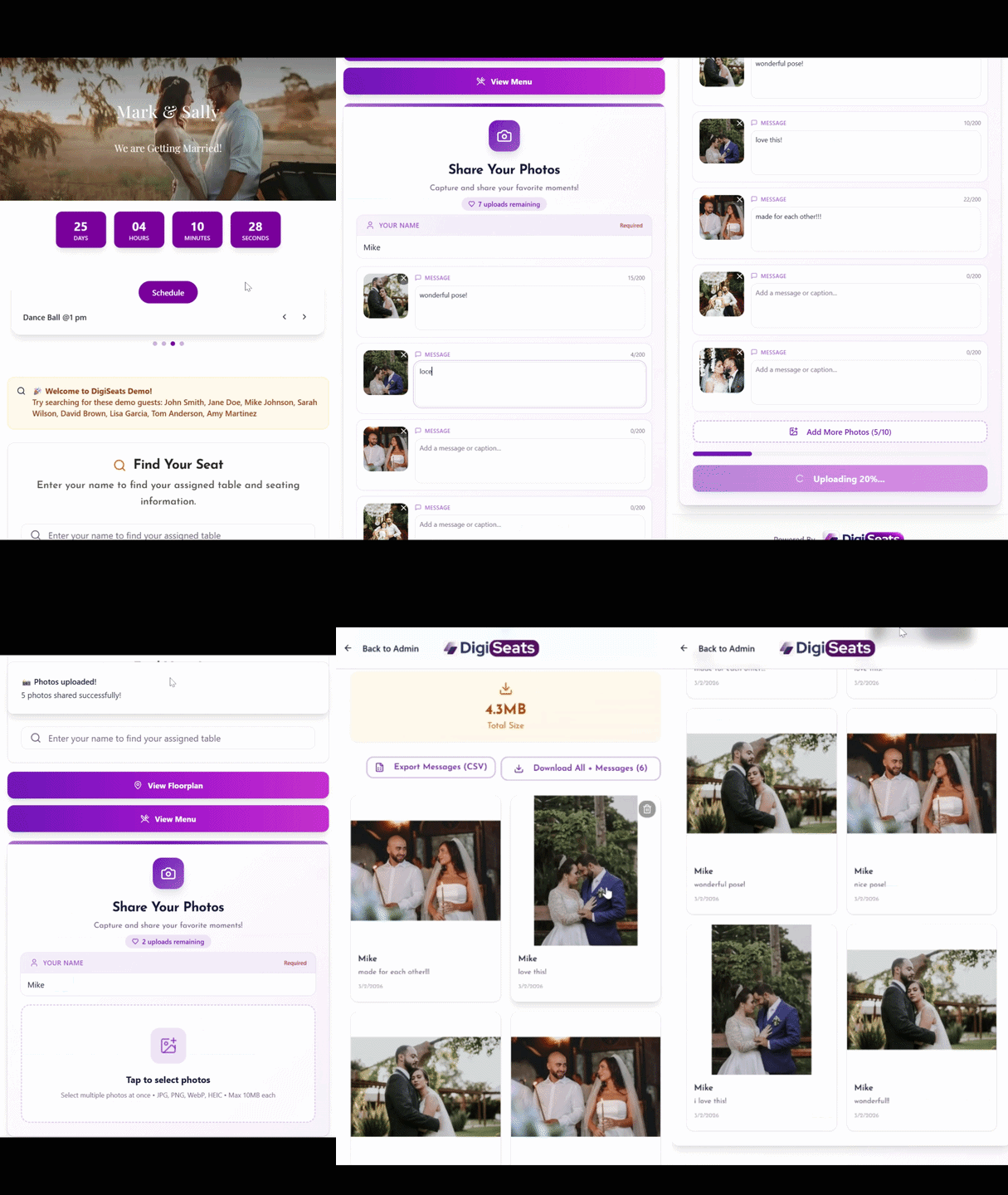
    Animated demo showing how guests scan a QR code to upload wedding photos and leave personalized messages using DigiSeats

    Guest Photos Shouldn't Be This Hard to Collect

    Images end up split across group chats, WhatsApp threads, AirDrops that never happened, and social media stories that disappear. The best candid memories are scattered everywhere.

    Photo Upload Fixes That

    Guests scan the same DigiSeats QR code already used at the event, upload photos directly from their phone, and add a personalized message with each photo. The host views everything in the backend, then downloads all photos and messages together as a single ZIP file.

    Available only with DigiSeats Extended — $99.99
    Zero Friction

    A Wedding QR Code for Photos That Guests Actually Use

    Many photo-sharing ideas fail because they ask guests to do too much. Photo Upload works because it matches guest behavior — no app, no login, no complicated instructions.

    Guests scan the QR code using their phone camera

    The upload page opens in a mobile browser

    Guests select photos and upload right away

    Guests can write a message on each photo

    Step by Step

    How the QR Code Photo Upload Works

    Guest Experience

    1

    Open the camera and scan the QR code

    2

    Tap the link that appears

    3

    Upload event photos from the phone

    4

    Add a personalized message for each photo

    Guests can upload

    Dance floor moments
    Table selfies & group photos
    Behind-the-scenes setup
    Candid shots during speeches
    Bar & photobooth fun
    Family moments

    Host Experience

    View photos uploaded by guests

    View the personalized message attached to each photo

    Download all photos and messages together as a ZIP file

    No chasing guests. No digging through messages. No saving files one-by-one. Everything organized in one place.

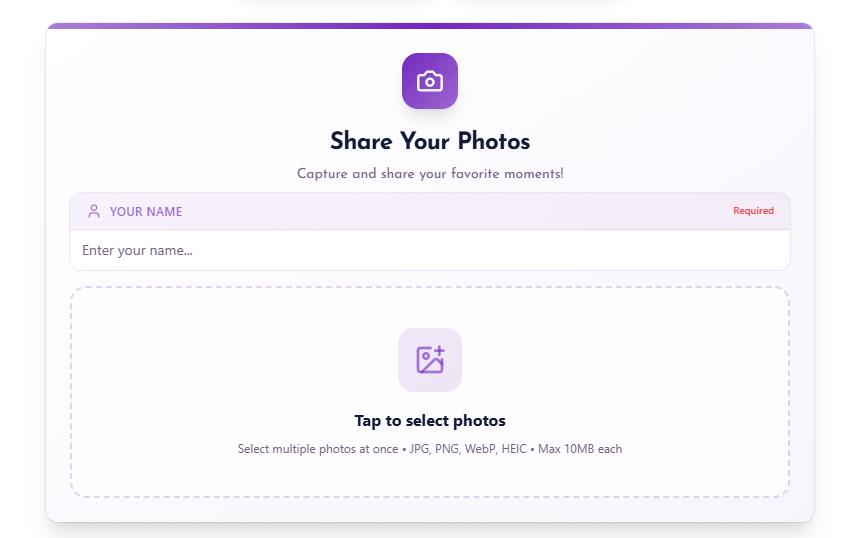
    DigiSeats guest mobile view showing the QR code photo upload interface where guests enter their name and select photos to upload at a wedding

    Guest view — scan, enter name, and upload photos in seconds

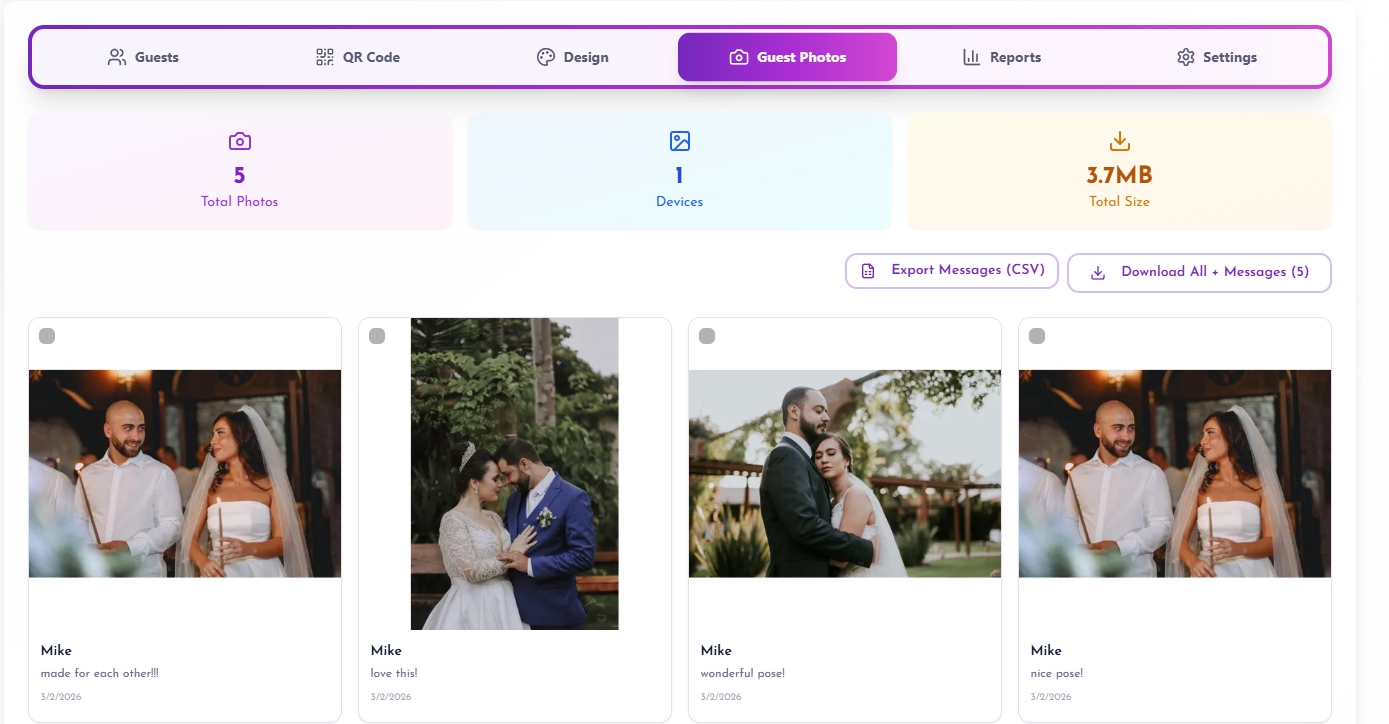
    DigiSeats host backend dashboard showing a gallery of uploaded wedding guest photos with personalized messages and ZIP download option

    Host backend view — browse guest photos, read messages, and download as ZIP

    More Than Photos

    Personalized Messages Make Photos More Meaningful

    A short message can preserve the moment in a way an image alone cannot. Photo Upload becomes a lightweight digital guestbook.

    "Right before the first dance, everyone started cheering"

    "This was the funniest toast of the night"

    "Your mom was glowing during this moment"

    "This was the table group right after dinner"

    "The song that brought everyone to the dance floor"

    Why Move Beyond Traditional Photo Collection

    Traditional Methods

    • Asking guests to text pictures later
    • Creating a shared album and hoping guests find it
    • Posting a hashtag and hoping guests upload publicly
    • Sending follow-up emails after the wedding

    Results in low participation, delayed uploads, and scattered photos.

    QR Code Photo Upload

    • Captures photos while guests are in the moment
    • Upload takes seconds — participation rises
    • Personal messages make uploads more meaningful
    • One ZIP download — clean archive, minimal effort

    Built into the same QR code — no extra signage needed.

    One QR Code for the Entire Event Experience

    No more multiple QR codes for seating, menu, schedule, and photos. DigiSeats keeps everything under one scan — reducing signage overload and guest confusion.

    "Scan to upload your photos from tonight"

    "Share your photos with the couple. Scan here"

    "Scan to upload photos and leave a message"

    "Help capture the night. Upload your photos here"

    Beyond Weddings

    Perfect for Weddings and Beyond

    Weddings & Multi-Event Celebrations

    • Engagement parties
    • Welcome events
    • Sangeet & Mehndi nights
    • Ceremony & reception
    • After-parties & brunch

    Corporate & Charity Events

    • Galas and fundraisers
    • Corporate dinners
    • Team celebrations
    • Post-event recaps
    • Internal newsletters

    Community Events

    • School banquets
    • Cultural celebrations
    • Community gatherings
    • Award ceremonies
    • Inclusive photo collection

    Download Everything as ZIP

    After the event, download all photos and messages in one ZIP file. Save to your laptop, back up to cloud storage, share with your photographer, or organize into albums.

    • Portable and easy to store
    • Share with photographer or editor
    • Organize into family albums

    Photo Storage Policy

    Photos are stored on DigiSeats servers for 10 days after the event. Download the ZIP within that window to keep a permanent copy.

    This encourages couples and organizers to grab the archive while memories are fresh, then save it wherever they prefer for long-term storage.

    Best Practices

    Increase Guest Photo Participation

    Where to Place QR Code Signs

    1Entrance welcome area
    2Bar area — guests naturally pause
    3Dance floor entry — candid photo zone
    4Photo booth area — guests are in "photo mode"
    5Guestbook or gift table
    6Lounge seating area

    For medium to large events, 2–4 signs usually work better than one.

    Sign Design & MC Tips

    Make the QR code large enough to scan from a comfortable distance
    Use strong contrast — dark QR code on a light background
    Keep the text simple and direct
    Avoid glossy frames that catch glare from spotlighting

    MC Announcement

    "Please scan the QR code on your table or near the bar to upload your photos and leave a message for the couple."

    This one sentence can double participation.

    Extended Only — $99.99

    How to Get Started

    1

    Purchase DigiSeats Extended

    2

    Enable Photo Upload in the backend

    3

    Display the QR code at the event

    4

    Download ZIP within 10 days

    Get DigiSeats Extended
    Included with Extended

    Other Extended Package Features

    Up to 1,000 Guests

    Built for larger events. Add more at $10 per 100 guests.

    Real-time Check-in Tracking

    Track arrivals live on event day.

    Timestamped Check-in Logs

    Download check-in data with timestamps for clean reporting.

    Photo Background Branding

    Add custom photo background matching event theme.

    Floorplan Upload

    Upload venue floorplan for guest navigation.

    Menu Upload

    Share event menu digitally via QR.

    Event Schedule Upload

    Add full itinerary with times and key moments.

    Event Countdown Timer

    Build excitement with a countdown on the event page.

    Priority Support

    Faster response for time-sensitive event day issues.

    Frequently Asked Questions

    What is the DigiSeats Photo Upload feature?

    Photo Upload is an Extended package feature that lets guests upload event photos using the same DigiSeats QR code they scan at the wedding or event.

    Is Photo Upload included in every DigiSeats plan?

    No. Photo Upload is available only on the DigiSeats Extended package ($99.99).

    How do guests upload wedding photos using the QR code?

    Guests scan the event QR code with their phone camera, open the page in their mobile browser, select photos, and upload.

    Do guests need to download an app to upload photos?

    No. Guests upload photos directly from their phone using a mobile browser, no app download required.

    Can guests upload photos during the event or only after?

    Guests can upload photos during the event, right when moments happen, as long as Photo Upload is enabled for that event.

    Can guests add a message with their uploaded photo?

    Yes. Guests can write a personalized message on each photo they upload.

    Where can the host view the photos guests upload?

    The host can view all uploaded photos and their messages in the DigiSeats backend.

    Can the host download all photos at once?

    Yes. The host can download all uploaded photos and messages together as a ZIP file from the backend.

    How long are guest-uploaded photos stored?

    Photos are stored on DigiSeats servers for 10 days after the event, so the host should download them within that period.

    What happens after the 10-day storage period ends?

    To avoid losing access, the host should download all photos and messages as a ZIP file within the 10-day window.

    What types of events can use the QR code for photos feature?

    Photo Upload works for weddings, receptions, engagement parties, galas, corporate dinners, charity events, birthdays, anniversaries, and more.

    Can the same QR code be used for seating and photo uploads?

    Yes. When Photo Upload is enabled on Extended, guests can use the same event QR code experience to upload photos.

    What is the best place to put the QR code signs for photo uploads?

    Common high-participation spots include the entrance welcome sign, bar area, dance floor area, guestbook table, and photo booth area.

    What should the QR code sign say to encourage guests to upload?

    Simple lines work best, such as "Scan to upload your photos" or "Share your photos and leave a message."

    What photo formats are supported for guest uploads?

    DigiSeats Photo Upload supports common image file types used by smartphones, including JPG/JPEG, PNG, and HEIC (iPhone). If a guest's phone creates a different image type and it does not upload, ask them to try uploading a JPG or PNG version instead.

    Turn Guest Photos into a Complete Wedding Memory Collection

    Guests scan, upload, and leave a message. You download a complete ZIP of photos and messages. It's that simple.

    Get DigiSeats Extended — $99.99